Showing posts with label linx 10. Show all posts

Sunday, 2 August 2015

Windows 10 on more machines


I've written another poem, made entirely out of the names of Auk-class minesweepers, which were built by the Americans in the Second World War. Most were scrapped but at least one remained in active service until the 2000s. Those lost are highlighted in bold:

Seer and sentinel
staff and spear
skylark and starling
herald and heed

Ptarmigan oracle
champion broadbill and
ruddy roselle and
swift steady speed

tumult and tide and
threat and triumph
and redstart and broadbill
waxwing and
auk

The orcs were the baddies in Lord of the Rings and in the previous-but-one post I installed Windows 10 on an old laptop and that seemed to go well so what's it like on some other machines eh?

What's it like? What's it like on a Dell D630, which I didn't photograph so you'll have to imagine it? The D630 is cheap as chips on eBay and as a favour I installed Windows 10 for a friend / coughed plague sputum onto the lymph nodes of an unwitting victim. The machine has a notorious design flaw whereby the CPU and the GPU share a heatpipe, but the BIOS only blows the fan when the CPU gets hot, so if you play games that tax the GPU - but not the CPU - the GPU fries. Dell eventually released a BIOS fix that blew the fans more often. Some D630s are tougher than others, and on the whole upgrading it from Windows 8.1 to Windows 10 was exactly the same as upgrading a ThinkPad X61. Boring.

A HP Compaq TC4400 Windows pen tablet.

What about an old-fashioned Windows tablet, in this case a Hewlett-Packard Compaq TC4400? Mine has the same basic hardware as my X61 - a 2ghz Core II Duo - but feels a lot slower, not just because it has a conventional hard drive. I upgraded from Windows 7 Pro, which was again unproblematic. However Windows 10 isn't so fine on a TC4400. There are two problems, which presumably apply to the earlier TC4200 and perhaps TC1100 as well.


The machine has some extra things. When folded into a tablet the designers intended for you to hold it in portrait orientation, cradled in your left arm, with your right hand using the stylus and your left hand giving it the reach-around. The bezel-mounted jog-wheel works, but HP's special buttons don't. The Q and Stylus buttons are basically superfluous but the rotation button is dead handy. Alas, HP gave up on the TC4400 long ago - the most recent drivers are for Windows Vista. In contrast Lenovo has a couple of Windows 10 drivers for the X61, and all of its things - the fingerprint reader, the trackpoint, the little keyboard lamp, the hotkeys - work.


The second problem is that the on-screen keyboard defaults to this horrible handwriting recognition nonsense. Handwriting recognition was one of those clever-until-you-think-about-it ideas that contributed to the total failure of pen computing throughout the 1990s and 2000s. You can manually switch to the tappy-tappy keyboard, but seemingly there's no way of making this the default, so you have to do it all the time. As a consequence the TC4400 doesn't work very well as a tablet.


But at least they fixed one of the Windows 8 keyboard's biggest irritants - the CLOSE X is now large and clearly separated from the backspace button. I often found myself tediously entering passwords, hitting enter, and then hitting X to close the keyboard, but accidentally hitting the backspace button - which navigates back to the previous page in Chrome and other browsers - thus forcing me to enter the password again. This did not make me a mellow man. Against it, the keyboard still doesn't pop up automatically as it did when Windows 7 was used in tablet mode.


Let's have a look at my Linx 10, which is one of those Windows 8.1 with Bing tablets. Windows 10 upgrades into conventional Windows 10 Home, which is aimed at women who want to download recipes or something. I can tolerate this in a tablet.


Not Windows 10 Home with Bing, just Windows 10. My device has a 32gb flash drive, with about 15gb used up by Windows and other things. The installation process came close to filling this up - once I had finished there was only 3gb of free space left. Disk Cleanup removes a tonne of stuff although this obliterates any hope of returning back to Windows 8.1, but on the other hand the tablet is essentially disposable.

Windows 10 takes up much the same amount of space as Windows 8.1.

The Disk Clean-up dialogue is one of the few hold-overs from ancient versions of Windows. You can't resize it even though it's very important. Remember when the Windows display menu had a drawing of a CRT? I wonder if there are any dialogue boxes hidden away in Windows 10 that date back to Windows 95. That would be an interesting project. The system properties window that lets you change swap file space is basically the same as it was in 1995. Still, Windows 10 seems to work fine on a Linx 10, but then again it is essentially Windows 8.1 with a mass of tweaks.

No, there's one major irritant. In Windows 8.1 it was easy to put Microsoft's OneDrive cloud storage folder onto your SD / MicroSD card, which is pretty crucial if you only have 12.9gb of free space on your main drive. For no reason whatsoever Windows 10 removes this option. There is a workaround, which involves mounting the card onto a folder on your main drive, but why?


Next up, my desktop machine. I'm going to upgrade at some point. The thrill of danger excites me. It's like having teeth pulled out or walking into a room full of strangers, or appearing nude on stage or putting the shotgun in your mouth and pulling the trigger; it's going to happen at some point, why not get it over with now? It is only after death that we become immortal, but it is not us that survives, it is our work; or rather it is other people's perception of our work that survives.

A perverted, misunderstood reduction of our work survives. In fact it would be more accurate to say that nothing survives. The present has its way with the past. Even though digital archiving and cloud storage will ensure that present-day media will remain perfectly preserved forever, what does that matter if no-one ever looks at it? If instead people only read summaries, or second-hand descriptions? Moby-Dick is as far as I know in the public domain, but who reads it?

I occasionally think about John Diamond. He was a British journalist and exceptionally minor TV celebrity, notable for appearing as a panellist in the consumer-affairs-and-talking-dog show That's Life. Nowadays he is remembered entirely for being Nigella Lawson's first husband and for dying of cancer, at the age of 47 in March 2001. On the positive side he spent the last nine years of his life in a position where he could watch Nigella Lawson taking a shower if he wanted; millions of people have died of cancer without ever seeing Nigella Lawson naked, or indeed ever having had a full stomach or a day without pain. Diamond wrote a newspaper column about his battle with and eventual defeat at the hands of his illness, but although the column attracted a huge amount of attention at the time, none of it is on the internet and he isn't likely to wow the Imgur crowd. But what does it matter that he will fade into obscurity? He died knowing that his struggle had inspired others; people of the future will have to help themselves.

I was installing Windows 10 on my desktop machine. I know every nut and bolt and cog. I built it with my own hands. It's an i5-2500K with 8gb of memory, a couple of conventional hard drives, a bog-standard AMD graphics card, running 64-bit Windows 7 Pro. I bought the Pro version entirely for Windows XP Mode, which was essentially a VM with a Windows XP image. Windows 8 ditched XP Mode and Windows 10 doesn't bring it back; the shortcuts remain but they don't work. It's a shame that you can't keep the Windows XP image to use with e.g. VMWare Player.


Still, life is full of sacrifices. Especially if you live in Cornwall, eh? No, seriously, again the installation went without a hitch. Of course I have to say this because I'm being paid handsomely by Microsoft to advertise their products, but the company must have done a tonne of work to keep all my applications working through the install. I didn't have to reinstall anything. Steam works. Flight Simulator X works, at least until I try to quit, at which point the screen goes black. It was always a bit flaky. There's a Steam version, apparently. Photoshop CS4 works. Premiere works. VLC works.

Windows 10 is much less obnoxious than I expected when it comes to default file handling. In my opinion the whole "text search to find configuration panels" aspect is executed better in OS X, but on the other hand Windows 10's use of widget things - they call them apps nowadays - is less pointless than OS X's dashboard but on the other, other hand, on a desktop machine the apps are now essentially just ordinary Windows applications that run in a window like any other Windows applications, e.g. the calculator above, so what's the point of them?


There appears to be no way to make the new start menu wider. One of those entries is Microsoft Flight Simulator X with default settings or something - I don't remember - but which one? Right-clicking is unhelpful. And there seems to be no way to rename the tiles. They're shortcuts, and you can rename the shortcuts, but I just want to right-click and make the tile say Photoshop CS4 32-Bit without fiddling around with the shortcut and I can't.

I haven't tried to install it on my ThinkPad 600X - a 500mhz Pentium III with half a gigabyte of memory - but I'm not hopeful that it would work. Still, isn't it nice of Uncle Microsoft to give us a free new operating system out of the goodness of their hearts? You should be thankful. I've seen people on the internet mocking Windows 10. Don't listen to them! Their words are poison. And so are they. One day they will find themselves swirling around in a cesspool of their own making, and it will be all their fault because Uncle Microsoft will find them and fix them.

"Everybody now has the chance to choose the part which he will play in a film a hundred years hence. I can assure you that it will be a fine and elevating picture. And for the sake of this prospect it is worth standing fast. Hold out now, so that a hundred years hence the audience does not hoot and whistle when you appear on the screen."

Monday, 27 July 2015

Linx 10: Icicles Rocked by Waves


Goodbye stretcher. You remember tee-hee. The grand old duke of salamander took off with barney's bull and roasted three pence of finest great dane. The flat-wheeled flick pass flicked a live wire lizard and today we're going to have a look at the Linx 10. It's one of those Windows tablets that emerged overnight at the tail end of 2014.

It runs Windows 8.1 with Bing and it's essentially a laptop PC but in tablet form, at a price point that competes directly with Android tablets. Unlike ARM-powered Windows RT tablets it's compatible with all of the typical PC applications that you know and love, such as Photoshop and Steam and so forth, and unlike Microsoft's own Intel-powered Surface Pro tablets it isn't vastly overpriced.

It doesn't run Android natively, although it's powerful enough to run an Android emulator such as DUOS, for example:

Looking squashed there in a window - it's a lot better full-screen.

A wave of these cheap tablets appeared last year. Microsoft wanted to get Windows 8.1 out there and Intel wanted to sell some of its mobile Atom chips - the two companies were starting to worry that Android running on ARM would steal away their future - and so both companies slashed their licence fees. OEM manufacturers in the Far East immediately responded by launching these things.

There have been some name-brand Windows tablets and lots of models from made-up companies that don't really exist; Linx seems to be the most popular in the UK. As far as I can tell Linx is just a postal address and a website. Google keeps telling me that I'm searching for Linux instead; I'm not.

Running STALKER: Shadow of Chernobyl, which is surprisingly playable even at 1920x1080 on an external monitor. The most obvious problem is that the Linx is a touchscreen tablet, but almost all PC games require a keyboard and mouse, which means you have to start plugging things into the tablet and packing extra peripherals in your suitcase, which removes some of its portability.

Linx sells three Windows 8.1 with Bing tablets. What's Windows 8.1 with Bing? It's Windows 8.1 with Bing as the default search engine in IE. I don't use IE so I don't notice it. You can change it. It's not a problem.

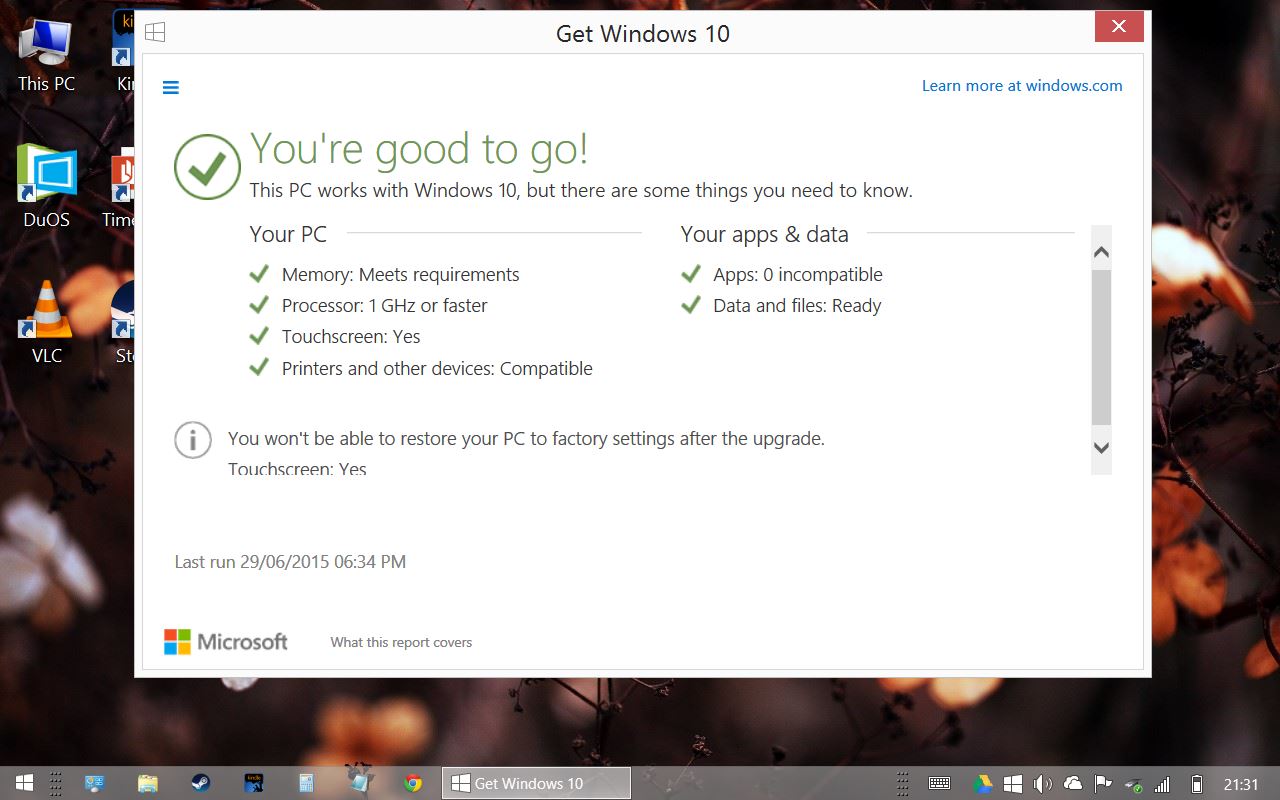
Will it upgrade to Windows 10? Apparently so, although I'll wait until Windows 10 has been out for a while before doing so:


EDIT: In the next-but one post I upgraded to Windows 10, which was painless although the installation process almost filled up the hard drive. Running Disk Cleanup returned most of the space, although running this removes the possibility of going back to Windows 8.1. The upgrade ditches the with Bing nonsense and installs plain Windows 10 Home instead:

Linx sells three Windows 8.1 with Bing tablets. I've said that before. Three of them. The Linx 7, the Linx 8, and the Linx 10. They're broadly the same, with a 1280x800 touchscreen, a quad-core Intel Atom clocked at 1.33ghz, 1gb of memory, a mini-HDMI port, headphone socket, one mini-USB port, one MicroSD slot.

They all have a tiny 32gb eMMC flash drive for onboard storage, which is slower than an SSD and really only large enough for Windows and Office and a few other applications. You're supposed to offload everything - especially Steam games - onto the MicroSD card, which is a tenner for another 32gb, half again for 64gb.

There are differences between the models. The screen size, obviously. The Linx 7 has a 7" screen, the Linx 8 an 8" screen etc. Windows 8.1 with Bing is free on smaller devices but manufacturers still have to pay for anything larger than 9"; the Linx 10 is proportionately more expensive than the other two models, but perhaps to compensate for this Linx doubled the memory to 2gb. That's the main reason I bought the 10" model. Prices are roughly £60, £90, and £150 respectively. Of the three, the 8" model seems to be the most popular.

Another thing - the 7" and 8" models charge through the micro USB port, the 10" model has a separate charging port, which means you can leave it plugged in while using the USB port. Sadly the charger has a very short cable.

Windows 8.1 is a mixed bag. I've used the tablet editions of Windows 8, Windows 7, and Windows XP, and 8.1 is fine but in one respect it feels a bit of a step back - the keyboard doesn't automatically pop up when you select a text area! You have to continually pop open the keyboard manually. And the "keyboard close" button is right next to the "delete / back" button, so I constantly find myself typing search terms, hitting enter, hitting delete/back accidentally, and then going back a page.

The XP / Windows 7 floating keyboard was better - it popped up automatically and you could grab and resize it much more easily. Google Chrome tries to restore some of the pop-up functionality although it's hit and miss.

It's Half-Life 2. The machine has some trouble with DOSBox - it's a CPU-intensive application, and ironically UFO: Enemy Unknown was very sluggish - but mid-2000s 3D games seem to run really well.

Performance-wise, my Linx 10 is roughly on a par with one of the slower Core Duo laptops from 2006 or so, or at least that's what the SuperPi score suggests:


That's the kind of score that you'd expect from one of the 1.6ghz, 1.4ghz Core Duos. But on the other hand it has a much more powerful graphics system than any 2006 laptop and feels subjectively must faster - I mentally peg it as a really fast Core II Duo desktop system of the mid-late 2000s, except in a box the size and weight of one of those posh rectangular plates you get at posh restaurants. With the sauce dribbled around the outside of the food.

I'm a long-term tower case desktop PC man, with five fans and two hard drives and expansion cards and external hard drives, but I'm impressed at how far and fast mobile chips have come on in the last ten years. The Linx 10 doesn't have a fan, it's lightweight, it's on a par with a good laptop of a few years ago, but it's the same size and weight as one of those posh plates etc sauce etc.

I used mine with an external monitor at 1920x1080 for a while. It chugged a little but that might have been raised expectations on my part. The 1gb models probably wouldn't be much fun, and even with 2gb Firefox lags a bit, but you can in theory hook any of these machines up to an external monitor, plug in a keyboard and mouse (or use a wireless suite, in which case you only use one USB port), and use them as basic browsing / wordprocessing / simple games machines.

The Intel x86 / Windows architecture was invincible a decade ago. A lot of water has gone under the bridge since then and "wintel" doesn't seem invincible any more. Wintel is less of a draw than it was, but it's still a powerful draw. With the 7" or 8" models you have Photoshop in your pocket - grown-up, full-sized Photoshop. It probably won't be very fast Photoshop but you have that option. For music applications something like Ableton Live works at 1280x800; if you're recording interviews a Linx tablet with Audacity plus an external microphone rivals a pocket recorder for portability and beats it for flexibility. There are fewer and fewer things you can't do with Android nowadays, but generally Wintel does everything all at once and there are more options.


With an external monitor, running Firefox on the desktop (top) and a Metro application (bottom).

Surprisingly my Linx came without any bloatware at all, just a year's free subscription to Microsoft Office which you have to redeem by August. This gives you the option to install Office on a PC, a tablet, and a smartphone, and obviously trendy people like you and I pooh-pooh Office but the plebs might like it.

Will it last? The Linx is a sealed unit, neither the battery nor the flash drive can be replaced. There's no way to boot from the Micro SD card, so if the internal hard drive fails the device is kaput; but you're probably not going to keep your life on it. The battery lasts for six hours or so although Windows taxes it even when it's on standby - it helps if you disconnect from wifi and turn "flight mode" on. Eventually both the battery and flash drive will wear down although I suspect the machine will have been shoved into a cupboard long before then.

And that's the Linx. As with the Eee netbook of a generation ago it's really an expectation game. As a Windows laptop it's far behind the curve, and once you add a keyboard and mouse it's not portable any more; but as a pocket tablet that runs actual genuine Windows applications it's amazing.

What's it like to use? I took it on holiday to Budapest earlier in the year, replacing my Asus Transformer. I used it exclusively in desktop mode, in which case the buttons are occasionally fiddly but otherwise it was more flexible than an Android tablet. I used it mostly to surf the internet or read Kindle books. One thing Android/iOS has that the Windows App store doesn't is a range of airline check-in applications; DUOS dealt with that, and I suppose if you have an Android smartphone you can use that instead, but it's one of a growing number of things that don't have standard Windows equivalents, which is a sign of the times. On the other hand, I could interface the Linx with my hand-held Garmin eTrex GPS navigator, pop open Google Earth and EasyGPS, and transmit waypoints to the eTrex, which would have been awkward or impossible with Android. VLC plays any of the porn you download-thing, it plays anything.

As a mobile productivity device it has the same problem as all other tablets - you have to pack a keyboard and a mouse and perhaps a USB hub and an SD card reader and some extra (Micro)SD cards, and the charger, at which point you have a bundle that takes up as much room as a laptop. But you can use the tablet independently. I suspect that one of the biggest First World Problems - your smartphone is powerful but too small to use all the time, your tablet doesn't make phone calls and isn't practical as a GPS navigator or phone, packing both feels redundant but you have to take the phone but the tablet is very useful too - is irresolvable.

~

Over the last few years I've tried a variety of mobile solutions. At first I used books, which last for years but are very limited unless you cut out the pages and re-arrange them. Then I used an original Asus Eee 701, one of the cute little white models; then I upgraded to a later seashell Asus Eee 1005HA, which was less cute but a lot more functional. The Linx is faster and lighter than late-period netbooks.

Then I moved to a Thinkpad X61 12" subnotebook, which was lighter than the netbooks and much more powerful, but only slightly larger - netbooks had lost the plot by then - and eventually I tried out an original Asus Transformer TF101, an Android tablet with an unusually functional keyboard dock. I am essentially platform-independent (the headline image shows a Linx sitting on top of an old MacBook Pro, which is really too large to use on the move), and of all these different solutions to the problem of reading, researching, writing, surfing the internet and listening to music whilst on holiday or on the train I'm not sure which is best.

The Linx has the performance of a really fast netbook and it's even lighter than the Asus Transformer, although the battery doesn't last as long, and I prefer the Android version of Kindle to the Windows desktop version. App-wise, Windows is hard to evaluate - the Windows Store apps are mostly dire and pointless, with a huge number of outright cons, but on the other hand you have the standard Windows repertoire, but then again as with netbooks none of the standard Windows applications are optimised for a small touchscreen, but again again the 1280x800 screen of the Linx is a standard PC resolution whereas the 1024x600 screens of netbooks was not.

Emotionally I prefer the Thinkpad, because it feels like a proper computer. It has a really nice keyboard. I still have it, whereas I have sold off most of the aforementioned. But it doesn't fit easily into a bag and the battery life isn't very good, and it's not something that can easily be whipped out and turned on. My hunch is that something like a MacBook Air would be ideal, but perhaps there is no single solution to the mobile problem. It is nonetheless striking to think back all the way to 2000, 2001, when mobile internet was a pipe dream; we've come a long way since then.