Showing posts with label tablet. Show all posts

Saturday, 9 March 2019

iPad Mini 2 in 2019: Malarkey, or Effective Way?


Let's have a look at the Apple iPad Mini 2. It's a small tablet released way back in 2013, before many of you were born. It's ancient in tablet terms, but as of March 2019 Apple still supports it. It runs iOS 12, which is the most recent version of iOS. In fact it runs iOS 12 surprisingly well, better than it ran iOS 11. A few features aren't available, notably Apple Pay and any form of fingerprint recognition, but in my opinion Apple Pay makes more sense on something smaller.

The Mini 2 is available cheaply on the used market so I decided to try it out. I wanted a small, well-made tablet to take on holiday, preferably a tablet that wouldn't be bent out of shape by my luggage. The Mini 2 is made out of aluminium and has a glued-together unibody design that's apparently a nightmare to open, but this is more of an issue with laptops. I don't mind having a sealed tablet, it's not something I expect to upgrade.

iOS has a terrific range of virtual instruments. Shown here is iVCS3, a simulation of the EMS VCS3. Surprisingly the Mini 2's Lightning port delivers enough power to drive a small MIDI keyboard without the need for a powered USB hub. It also powers the Arturia Beatstep featured in the previous post.

Why not an Android tablet? I have nothing against Android. My first tablet was an Asus Transformer. The problem is that long-term support with used Android tablets is a minefield - manufacturers tend to shove out a single Android upgrade, then give up - and I'm bored with rooting things, and Google seems to have given up on the Nexus range, and I'm not going to pay a lot for an Android tablet, and at the same time cheap Android tablets tend to be rubbish, that's why.

I also wanted a device with masses of battery life. I get nervous when my phone's battery meter goes below 92%. Because that's almost 90%, which is almost 89%, which is less than 90%. My phone has given me a psychological aversion to certain numbers. The number 89 interferes with my digestion. When I see the number 78 I can no longer hold my hands steady. I have been unable to drive for several years because the speed signs cause me to involuntarily cry out and shield my eyes.

Imagine the most terrifying horror film ever made. It doesn't have alien monsters or vampires etc. Instead it consists of a battery meter slowly counting down from 58% to 1%, at which point the screen goes blank.

Do mobile phone battery meters ever hit zero? How can the phone show a battery meter if there's no power? These thoughts and many more swirl through my head in the early hours of the morning.

I smell bacon / I smell pork / run little piggy / I've got a fork

The Mini 2 remained on sale for an unusually long time. It wasn't discontinued until mid-2017. Judging by the serial number mine was made in January 2017. In theory it was replaced in 2014 by the Mini 3, but the Mini 3 was a very minor upgrade - a fingerprint sensor, plus a gold-coloured case. The Mini 3 was discontinued in 2015 so the Mini 2 actually outlived it.

Historically the first iPad Mini was launched in 2012. It was essentially an iPad 2 squeezed into a smaller body, with a 1024x768 display and half a gigabyte of memory. The Mini 2 was launched a year later with a faster processor, twice as much memory, and a high-resolution Retina display.

The Retina display was the big selling point, in fact the Mini 2 was originally sold as the iPad Mini with Retina Display. The Mini 2 has a 2048x1526 LCD panel, which would ordinarily result in teeny-tiny text too small to read, but iOS scales everything up so that it still looks like 1024x768 but twice as sharp.

Retina in action. At the top a 1280x800 Linx 10, admittedly not the leading edge of tablet displays even when it was new; at the bottom the 2048x1526 Retina display in a Mini 2. I found that I could read small text more easily on the Mini 2. My eyes didn't get as tired.

At 100%.

I've never used a Retina display before, at least not for any length of time. As mentioned elsewhere in this post Apple gets a lot of stick for selling overpriced products that have a few good features but are internally behind the curve, but the Retina technology works well and is worth the extra money. On the Mini 2 some websites look tiny, but I can still read the text, and even when the text is large the display is simply more attractive to look at. It took Android and Windows several years to catch up but even today Apple's implementation of high-DPI displays is slicker.


The Mini's leather smart case is like Apple in miniature. The design is neat - you can fold out a little panel to see the battery and wifi status, and when you fold it around the the back of the iPad there's a subtle bump that acts as a handhold, and you can fold it into a triangular stand, and it reliably makes the iPad go to sleep etc - but at £50 it's very expensive and the use of leather feels at odds with Apple's progressive image, comma, and furthermore it picks up scratches and bumps more than a simple plastic case.

As mentioned the Mini 3 was a very minor upgrade. The real true Mini 2 replacement was the iPad Mini 4, which came out in 2015 and is still on sale today. The Mini 4 has a more powerful processor, twice as much memory (2gb vs 1gb), and slightly more advanced wifi, but conceptually it's not all that different. If you're prepared to buy new the Mini 4 is awkward because it's surely on the verge of replacement, and yet it's a pretty good tablet that should hold its value on the used market.


This is Patterning, a drum machine, notable for its clever implementation of probability - instead of programming a separate fill pattern you can just set the probability of a snare hit to 5% or so, and you get periodic fills. The interface looks like a Designer's Republic album cover. You can make each layer revolve, which is good for random-sounding hi-hat lines, and I wonder what would happen if you threw out the drum sounds and loaded a piano or birdsong instead.

When it was new the Mini 2 was often compared with the iPad Air (2013), which was Apple's full-sized-but-thinner tablet; a common criticism of the Air was that it was more expensive than a contemporary iPad but larger and heavier than an iPad Mini and no more advanced internally, so why bother with it? The Air made it to a second generation before being discontinued. The iPad Air 2 (2014) is also a good used choice - it's more advanced the the Mini 2, and isn't much more expensive on the used market. Of course it's larger, with a 9.7" display versus 7.9".

EDIT: I spoke too soon about the Air being discontinued. On 18 March 2019 Apple relaunched the air, with the new iPad Air - just that, not Air 3, just iPad Air. Apple also launched a new iPad Mini, which again is just called iPad Mini. The new machines are similar to the previous generation but with more advanced processors, a wide colour gamut for the display, and Apple Pencil support.

My hunch is that iOS 13 won't support the Mini 2, if only because it only has 1gb of memory, and that by the end of 2019 the Mini 2 will be shifted to Apple's obsolete/vintage range. On the positive side all the apps I use should remain compatible with it for several years to come (Patterning, for example, still runs on iOS 8, ditto OSMAnd). I also have a hunch that iOS 13 won't support the Air 2 either, not for technical reasons but just because the Air 2 is very old.

OSMAnd running on an iPad Mini 2 (left) and a Motorola Moto G 2 (right). The bigger screen is nice, but the Mini 2 has one key flaw as a navigational tool - the wifi-only model doesn't have a GPS chipset! It relies on wifi location finding, which is naff even in a major city and useless otherwise.

I'm platform-independent. I only care about the software. The killer app. I own and still occasionally use a thoroughly obsolete Power Macintosh G5, because it runs Logic Express and works with my Mark of the Unicorn 2408 audio interface. I own an Android mobile phone because it runs OSMAnd, and a Windows tablet because it's widely compatible with lots of software.

On that level the iPad, and Apple's ecosystem, is both good and bad. If you're interested in music it's essentially the default choice, because there are far more synthesisers for iOS than Android and the general recording and sequencing infrastructure is more extensive. On a technical level I have no problem surfing the internet, sharing files with Google Drive, editing pictures with Photoshop Express, playing music, running OSMAnd etc, albeit that with only 32gb of internal storage and no card slot I can't download the entire world. You just have to accept that you can't put a bunch of films on a MicroSD card.

Apple Maps is a mixture of pleasure and pain. As on the desktop it looks wonderful, but it's not as extensive as Google Maps and doesn't feel as slick.

Safari is better than I remembered.

It has a tablet-optimised "Reader" view that strips out all the crap and turns web pages into miniature eBooks. Beyond that there doesn't seem to be a way of enlarging text on a standard website; you can zoom in, but then you have to swipe left and right all the time to read things.

I love The Daily Mail. It makes people angry and I love that. I admire it on a professional level. Notice how it runs stories about Meghan Markle that seem perfectly ordinary on the surface but are cleverly calculated to make the readers angry. It reminds me of The Sun during that newspaper's imperial phase in the 1980s; it is on top of the game.
It's also far more representative of contemporary Britain than any other newspaper. You might not like it, but it's true. Britain isn't intellectuals reading books in cafes.

Power comes from the iPad Mini's one and only Lightning port, which is where the bad starts. If you want to connect anything you need to use a dongle, and even then the Mini 2 only recognises USB devices that don't require drivers. In that respect my Windows tablet is much better because it supports essentially everything.

As far as Apple is concerned, if you want more storage you should use iCloud, and if that's not enough you should pay Apple for more space. The company's share price has taken a battering of late because Apple relies too much on hardware sales and not enough from services, although ironically Apple's revenues from iTunes and so forth are larger than e.g. all of Nike and General Dynamics (for example). I wonder if Carl Icahn will try to pressure Apple into spinning off iTunes as a separate company.

The Mini has a standard 3.5mm headphone jack, but the smart case is designed so that you need a long thin plug - I had to buy a short extension because my non-Apple headphones didn't click into place.

The River Po in Turin, which is where I went last week. It was February, it was 21c, all the Italians were dressed in winter gear, I went around barechested eating an ice cream because it was so hot.

Beyond that the iPad has some odd omissions. There's no built-in calculator app. The onboard photo editor lets you draw shapes, but doesn't let you resize images. I had to download Photoshop Express just to resize an image. The iPad has a files browser, but Apple greatly prefers for you to manipulate photos and music etc with iCloud, which isn't much fun if you don't have a mobile data connection.

In general desktop computers have a file-centric approach - you copy and paste files, click on files to open the application, move files with the Finder or Explorer etc - whereas Android and iOS have an app-centric approach whereby you open the app first, then open the file, then save it somewhere else etc; in this model files don't exist independently. I prefer the former approach. In Apple's defence Android is like that as well, they both try to abstract the file system into nothingness.

What else? Safari and Chrome both insist on using mobile versions of websites, even though the hardware is powerful enough for the full desktop experience. Adblock support is awkward with mobile browsers. You'd think Apple wouldn't mind, given that they make their money from direct sales to the public; I can understand Google wanting to force people to look at adverts, Apple should be better than that.


On the whole however I liked the Mini 2. The case is extremely well-made. It doesn't flex or creak. The battery life is such that while on holiday I didn't feel a compulsive need to charge it every night. It takes a while for my mind to "feel" a device's battery life, but with the Mini 2 78% still feels like plenty. I can cope with the storage limitations, or work around them, and fortunately Kindle eBooks don't take up much space.

What else? It has stereo speakers. They're surprisingly good. No bass, but there's a noticeable stereo effect. They're on the bottom of the machine, so the stereo stops working if you turn it sideways, but they're better than I expected. The screen has a 4:3 aspect ratio, which means that widescreen films have black bars at the top and bottom - just as God intended. There's a little switch on the right that mutes the iPad or locks the rotation. The switch only does two things and feels underutilised. It was eliminated from later iPads, comma, the end.

Monday, 27 July 2015

Linx 10: Icicles Rocked by Waves


Goodbye stretcher. You remember tee-hee. The grand old duke of salamander took off with barney's bull and roasted three pence of finest great dane. The flat-wheeled flick pass flicked a live wire lizard and today we're going to have a look at the Linx 10. It's one of those Windows tablets that emerged overnight at the tail end of 2014.

It runs Windows 8.1 with Bing and it's essentially a laptop PC but in tablet form, at a price point that competes directly with Android tablets. Unlike ARM-powered Windows RT tablets it's compatible with all of the typical PC applications that you know and love, such as Photoshop and Steam and so forth, and unlike Microsoft's own Intel-powered Surface Pro tablets it isn't vastly overpriced.

It doesn't run Android natively, although it's powerful enough to run an Android emulator such as DUOS, for example:

Looking squashed there in a window - it's a lot better full-screen.

A wave of these cheap tablets appeared last year. Microsoft wanted to get Windows 8.1 out there and Intel wanted to sell some of its mobile Atom chips - the two companies were starting to worry that Android running on ARM would steal away their future - and so both companies slashed their licence fees. OEM manufacturers in the Far East immediately responded by launching these things.

There have been some name-brand Windows tablets and lots of models from made-up companies that don't really exist; Linx seems to be the most popular in the UK. As far as I can tell Linx is just a postal address and a website. Google keeps telling me that I'm searching for Linux instead; I'm not.

Running STALKER: Shadow of Chernobyl, which is surprisingly playable even at 1920x1080 on an external monitor. The most obvious problem is that the Linx is a touchscreen tablet, but almost all PC games require a keyboard and mouse, which means you have to start plugging things into the tablet and packing extra peripherals in your suitcase, which removes some of its portability.

Linx sells three Windows 8.1 with Bing tablets. What's Windows 8.1 with Bing? It's Windows 8.1 with Bing as the default search engine in IE. I don't use IE so I don't notice it. You can change it. It's not a problem.

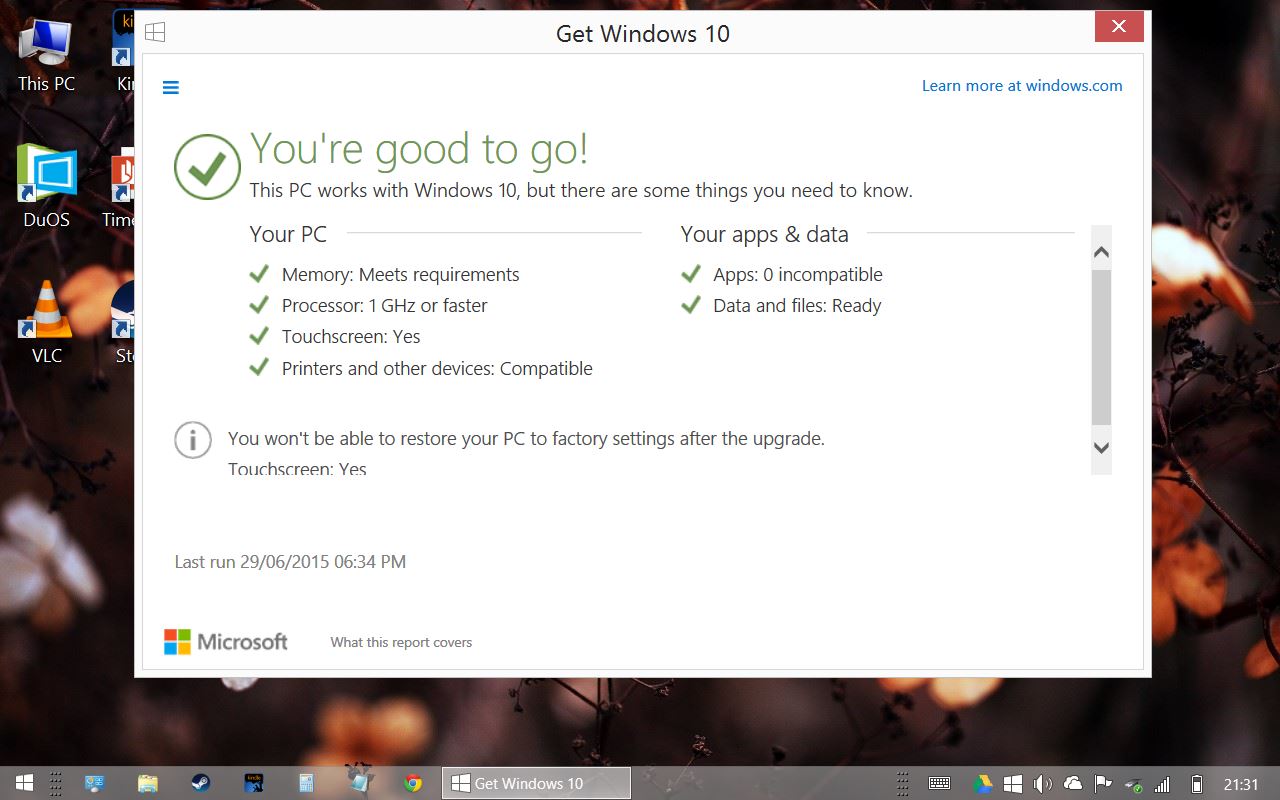
Will it upgrade to Windows 10? Apparently so, although I'll wait until Windows 10 has been out for a while before doing so:


EDIT: In the next-but one post I upgraded to Windows 10, which was painless although the installation process almost filled up the hard drive. Running Disk Cleanup returned most of the space, although running this removes the possibility of going back to Windows 8.1. The upgrade ditches the with Bing nonsense and installs plain Windows 10 Home instead:

Linx sells three Windows 8.1 with Bing tablets. I've said that before. Three of them. The Linx 7, the Linx 8, and the Linx 10. They're broadly the same, with a 1280x800 touchscreen, a quad-core Intel Atom clocked at 1.33ghz, 1gb of memory, a mini-HDMI port, headphone socket, one mini-USB port, one MicroSD slot.

They all have a tiny 32gb eMMC flash drive for onboard storage, which is slower than an SSD and really only large enough for Windows and Office and a few other applications. You're supposed to offload everything - especially Steam games - onto the MicroSD card, which is a tenner for another 32gb, half again for 64gb.

There are differences between the models. The screen size, obviously. The Linx 7 has a 7" screen, the Linx 8 an 8" screen etc. Windows 8.1 with Bing is free on smaller devices but manufacturers still have to pay for anything larger than 9"; the Linx 10 is proportionately more expensive than the other two models, but perhaps to compensate for this Linx doubled the memory to 2gb. That's the main reason I bought the 10" model. Prices are roughly £60, £90, and £150 respectively. Of the three, the 8" model seems to be the most popular.

Another thing - the 7" and 8" models charge through the micro USB port, the 10" model has a separate charging port, which means you can leave it plugged in while using the USB port. Sadly the charger has a very short cable.

Windows 8.1 is a mixed bag. I've used the tablet editions of Windows 8, Windows 7, and Windows XP, and 8.1 is fine but in one respect it feels a bit of a step back - the keyboard doesn't automatically pop up when you select a text area! You have to continually pop open the keyboard manually. And the "keyboard close" button is right next to the "delete / back" button, so I constantly find myself typing search terms, hitting enter, hitting delete/back accidentally, and then going back a page.

The XP / Windows 7 floating keyboard was better - it popped up automatically and you could grab and resize it much more easily. Google Chrome tries to restore some of the pop-up functionality although it's hit and miss.

It's Half-Life 2. The machine has some trouble with DOSBox - it's a CPU-intensive application, and ironically UFO: Enemy Unknown was very sluggish - but mid-2000s 3D games seem to run really well.

Performance-wise, my Linx 10 is roughly on a par with one of the slower Core Duo laptops from 2006 or so, or at least that's what the SuperPi score suggests:


That's the kind of score that you'd expect from one of the 1.6ghz, 1.4ghz Core Duos. But on the other hand it has a much more powerful graphics system than any 2006 laptop and feels subjectively must faster - I mentally peg it as a really fast Core II Duo desktop system of the mid-late 2000s, except in a box the size and weight of one of those posh rectangular plates you get at posh restaurants. With the sauce dribbled around the outside of the food.

I'm a long-term tower case desktop PC man, with five fans and two hard drives and expansion cards and external hard drives, but I'm impressed at how far and fast mobile chips have come on in the last ten years. The Linx 10 doesn't have a fan, it's lightweight, it's on a par with a good laptop of a few years ago, but it's the same size and weight as one of those posh plates etc sauce etc.

I used mine with an external monitor at 1920x1080 for a while. It chugged a little but that might have been raised expectations on my part. The 1gb models probably wouldn't be much fun, and even with 2gb Firefox lags a bit, but you can in theory hook any of these machines up to an external monitor, plug in a keyboard and mouse (or use a wireless suite, in which case you only use one USB port), and use them as basic browsing / wordprocessing / simple games machines.

The Intel x86 / Windows architecture was invincible a decade ago. A lot of water has gone under the bridge since then and "wintel" doesn't seem invincible any more. Wintel is less of a draw than it was, but it's still a powerful draw. With the 7" or 8" models you have Photoshop in your pocket - grown-up, full-sized Photoshop. It probably won't be very fast Photoshop but you have that option. For music applications something like Ableton Live works at 1280x800; if you're recording interviews a Linx tablet with Audacity plus an external microphone rivals a pocket recorder for portability and beats it for flexibility. There are fewer and fewer things you can't do with Android nowadays, but generally Wintel does everything all at once and there are more options.


With an external monitor, running Firefox on the desktop (top) and a Metro application (bottom).

Surprisingly my Linx came without any bloatware at all, just a year's free subscription to Microsoft Office which you have to redeem by August. This gives you the option to install Office on a PC, a tablet, and a smartphone, and obviously trendy people like you and I pooh-pooh Office but the plebs might like it.

Will it last? The Linx is a sealed unit, neither the battery nor the flash drive can be replaced. There's no way to boot from the Micro SD card, so if the internal hard drive fails the device is kaput; but you're probably not going to keep your life on it. The battery lasts for six hours or so although Windows taxes it even when it's on standby - it helps if you disconnect from wifi and turn "flight mode" on. Eventually both the battery and flash drive will wear down although I suspect the machine will have been shoved into a cupboard long before then.

And that's the Linx. As with the Eee netbook of a generation ago it's really an expectation game. As a Windows laptop it's far behind the curve, and once you add a keyboard and mouse it's not portable any more; but as a pocket tablet that runs actual genuine Windows applications it's amazing.

What's it like to use? I took it on holiday to Budapest earlier in the year, replacing my Asus Transformer. I used it exclusively in desktop mode, in which case the buttons are occasionally fiddly but otherwise it was more flexible than an Android tablet. I used it mostly to surf the internet or read Kindle books. One thing Android/iOS has that the Windows App store doesn't is a range of airline check-in applications; DUOS dealt with that, and I suppose if you have an Android smartphone you can use that instead, but it's one of a growing number of things that don't have standard Windows equivalents, which is a sign of the times. On the other hand, I could interface the Linx with my hand-held Garmin eTrex GPS navigator, pop open Google Earth and EasyGPS, and transmit waypoints to the eTrex, which would have been awkward or impossible with Android. VLC plays any of the porn you download-thing, it plays anything.

As a mobile productivity device it has the same problem as all other tablets - you have to pack a keyboard and a mouse and perhaps a USB hub and an SD card reader and some extra (Micro)SD cards, and the charger, at which point you have a bundle that takes up as much room as a laptop. But you can use the tablet independently. I suspect that one of the biggest First World Problems - your smartphone is powerful but too small to use all the time, your tablet doesn't make phone calls and isn't practical as a GPS navigator or phone, packing both feels redundant but you have to take the phone but the tablet is very useful too - is irresolvable.

~

Over the last few years I've tried a variety of mobile solutions. At first I used books, which last for years but are very limited unless you cut out the pages and re-arrange them. Then I used an original Asus Eee 701, one of the cute little white models; then I upgraded to a later seashell Asus Eee 1005HA, which was less cute but a lot more functional. The Linx is faster and lighter than late-period netbooks.

Then I moved to a Thinkpad X61 12" subnotebook, which was lighter than the netbooks and much more powerful, but only slightly larger - netbooks had lost the plot by then - and eventually I tried out an original Asus Transformer TF101, an Android tablet with an unusually functional keyboard dock. I am essentially platform-independent (the headline image shows a Linx sitting on top of an old MacBook Pro, which is really too large to use on the move), and of all these different solutions to the problem of reading, researching, writing, surfing the internet and listening to music whilst on holiday or on the train I'm not sure which is best.

The Linx has the performance of a really fast netbook and it's even lighter than the Asus Transformer, although the battery doesn't last as long, and I prefer the Android version of Kindle to the Windows desktop version. App-wise, Windows is hard to evaluate - the Windows Store apps are mostly dire and pointless, with a huge number of outright cons, but on the other hand you have the standard Windows repertoire, but then again as with netbooks none of the standard Windows applications are optimised for a small touchscreen, but again again the 1280x800 screen of the Linx is a standard PC resolution whereas the 1024x600 screens of netbooks was not.

Emotionally I prefer the Thinkpad, because it feels like a proper computer. It has a really nice keyboard. I still have it, whereas I have sold off most of the aforementioned. But it doesn't fit easily into a bag and the battery life isn't very good, and it's not something that can easily be whipped out and turned on. My hunch is that something like a MacBook Air would be ideal, but perhaps there is no single solution to the mobile problem. It is nonetheless striking to think back all the way to 2000, 2001, when mobile internet was a pipe dream; we've come a long way since then.

Sunday, 22 December 2013

Asus Transformer TF101: 'til All Are One

Flantier! Carlotta! Shown here with an external drive plugged into one of the USB sockets, just visible in the bottom left - try doing *that* with an iPad. In the background, an original Asus Eee looks on.

Today we're going to have a look at the original Asus Transformer, which was launched back in 2011. I remember being tempted by the Transformer when it was new, and now that they're available cheaply on eBay I decided to try one out. Depreciation has taken a heavy toll on the TF101's used value, but although it has some quirks it is still surprisingly capable.


That photo has nothing to do with the Asus Transformer, it's just that I can only photograph a tablet so many times before it gets boring. Purely as a tablet the TF101 is a generic landfill Android device; what sets it apart is the keyboard dock, which turns it - transforms it, like one of the Transformer toys - into a tiny quasi-laptop. Lots of tablets have keyboard docks, but the Transformer's dock is surprisingly functional. It has a second battery, an SD card slot and, unusually, USB ports.

Autechre's Gantz Graf was the point where casual Autechre fans gave up on the band, but I think it's fab - a bold, powerful evolving sonic sculpture that should have been number one across the world. I wrote this article whilst listening to it on a loop.

Astronauts of the ISS go on a spacewalk to fix the station's cooling system

The keyboard dock was an optional extra. You could buy the TF101 on its own, but nobody bothered because the keyboard was the main event. Technically the TF101 was called the Asus Eee Pad Transformer TF101, linking it to the older Eee netbook line, although at the time everybody just called it the Asus Transformer. 2011 isn't very long ago, but the modern tablet market was still fairly new and the TF101 was something of an experiment. Tablets themselves were experiments.

After all, in the words of Donovan Colbert, who had "over 16 years of experience in the IT Industry", writing in an article entitled Why the iPad will fail to win significant market share:
    "I think that the iPad will eventually be regarded much like Apple TV – a product that Jobs should have left on the drawing boards."
I have to wonder why "over 16 years", and not "two decades". Bear in mind that Donovan Colbert was paid money for that article. You're getting this one that you're reading now for free. And it's better-written, wittier, generally more perceptive. Perceptor was a G1 Autobot that transformed into a giant microscope with caterpillar tracks. Confusingly, Tracks - another Autobot - had wheels, not tracks.

Of course, the iPad and tablets in general went on to become very popular. Asus broadened the Transformer range by adding rubsigns and then a bunch of models that didn't even transform and as I write these words the company is on its fifth generation of tablets, with the TF101 being followed by the TF201, the TF300, the TF701, and the TF103C in that order. There's also a Windows-based "transformer book" called the T100, which would have been sold as an Ultrabook a couple of years ago but is now a budget model. The Transformers were originally aimed at the higher end of the market but the price has come down over time.

Android 4.2.2

OSMAnd, which uses OpenStreetMap data. I wonder how many people have slid through St Giles' Passage.

The TF101's immediate successor, the TF201, was also called the Transformer Prime, but this aroused the ire of Hasbro, who argued that it was too close to Optimus Prime, leader of the heroic Autobots. The eventual lawsuit was unsuccessful but Asus decided to abandon the Prime name nonetheless. And thus the next Transformer tablet was called the Transformer Ultra Magnus instead. No, I'm joking. Optimus Prime was actually replaced by Hot Rod, not Ultra Magnus.

Seriously, what was the deal with Ultra Magnus? The toy was originally designed for the pre-Transformers Diaclone range. It was simply a variation of Optimus Prime with some plastic bits added on to make him look bigger and more imposing. Hasbro decided to import this creation into the Transformers "universe" as a separate character, which was problematic, because Optimus was supposed to be the leader of the Autobots. It would make no sense for him to command a chap who was bigger than him.

And so Ultra Magnus was given a crippling inferiority complex, and as a consequence his character was a kind of Emo version of Prime, plagued by self-doubt. Thus he became a non-entity in the comics and cartoon continuity. He was too special to be used as a generic character, but not special enough to do anything significant. In the original movie he was given a shot at leadership, with disastrous consequences, and was immediately replaced by a brand-new character called Hot Rod, one of the few Transformers who already had a porn name.

I've always been fascinated with the process whereby the generic, unloved Diaclone toys of 1982 became one of the most popular toy ranges of 1984, and eventually one of the most lucrative toy franchises of all time. The toys were much the same, with slightly different colour schemes and decals. The thing that separates them is that the Transformers had meaning, because there was an invented backstory about an ancient war in space for the planet Cybertron, with a group of Autobots and Decepticons trapped on Earth, awoken in the present day to renew their conflict.

People often criticise highbrow art for being meaningless unless the audience absorbs reams of theory beforehand. "Works of art which cannot be understood in themselves but need some pretentious instruction book to justify their existence", in the words of Adolf Hitler. The Transformers toy franchise is a good example of a work of popular art that is inherently meaningless. Without the backstory - without the theory - the Transformers toys are just anonymous plastic robots. The same goes for Star Wars figures and vehicles. If the Star Wars toys had been invented by Mattel in 1977 (as Super Space Warriors or something), they would probably have bombed, just as Diaclone bombed. They would have been fundamentally unsatisfying unless you knew that your spaceship was called the Millenium Falcon, and it had been flown by a character called Han Solo.

Conversely some things are so impressive that it doesn't matter what they were made for. "Gantz Graf", the Autechre song in the link above, is pure spectacle, and I suspect any attempt at explanation would lessen it. The paintings of H R Giger are all surface, but they are overwhelmingly atmospheric surface. The odd thing is that the Diaclone toys were very impressive designs (the jets were better toy jets than actual toy jets, Megatron was a better toy pistol than actual toy pistols), and yet they had so little impact on the market that they were utterly forgotten just a couple of years later. And e.g. the successful Cabbage Patch Dolls had almost no backstory either. What can we learn from this about marketing a toy franchise? Not a great deal.

From top to bottom, an original Asus Eee (2007), a TF101 with its dock (2011), and an Asus 1005HA netbook (2010). The TF101 doesn't have ethernet or VGA. With the dock, the TF101 is surprisingly heavy - 1.2kg, which is almost the same as my ThinkPad X61.

At launch the TF101 came with Android three point something, and Asus was gracious enough to use a fairly stock installation without the masses of cruft that Windows laptops tend to have. The most recent official update took it to Android 4.0.3, and I've since upgraded mine to version 4.2.2 with an unofficial upgrade by a chap called Katkiss. Whose logo is quite obviously a dog. Is it a Hunger Games reference? Is that what the kids like nowadays? Android version numbers and names are alien to me. Suffice it to say that 4.2.2 feels a bit faster than 4.0.3 and it works, so why not? EDIT: I eventually installed Android 4.4.2, which is faster still, impressive given that the Transformer is three years old, and only has 1gb of memory and a dual-core CPU.

Dumb Ways to Die - so many dumb ways to die

Hardware-wise the TF101 runs on an a NVidia Tegra 2, which is essentially a dual-core ARM Cortex A9. This is the same processor used in the iPad 2, although performance-wise the iPad had a superior graphics chip. It's interesting to compare the TF101 with an old-school X86 tablet PC. Android tablets are designed to run forever on batteries without chucking out a lot of heat, and so they tend to have very weak CPUs by PC standards. In contrast PC laptops have fans and are only expected to run for five-six hours or so, and some of them are meant to be powerful enough to replace desktops. But tablets make up for the performance gap by pushing a lot of work onto the graphics hardware, and of course they all have SSDs, and the OS and applications are optimised for the limited resources of the tablet platform.

It's hard to compare directly, but Super Pi calculates Pi to two million digits in 1m 35s on my 2.1ghz Pentium M-powered HP TC4200 (2005), versus 1m 15s on the 1.0ghz TF101 (2011). Curiously the other Android version of SuperPi (without a space in the name) takes over eight minutes. The 2ghz Core II Duo in my ThinkPad X61 takes 53 seconds, so my hunch is that, CPU-wise, the TF101's dual-core Tegra 2 is on a par with one of the lesser early Core Duo CPUs from 2006, perhaps one of the 1.2ghz models. A rooted TF101 overclocks easily to 1.4ghz, which brings the score down to 1m 11s. Four whole seconds faster.

But there are far too many qualifications and caveats to draw a firm conclusion from this. Suffice it to say that Adobe won't be porting Premiere to the Android platform any time soon. But in an age of cloud computing, is there still a need for a high-powered client? Why not upload the video footage straight from the camera to a cloud service, and perform all the editing using the cloud's hardware? YouTube already has limited editing facilities, why not expand that model into a complete, cloud-orientated version of Premiere? You could use the tablet as a dumb terminal. You subscribe to the software, and if you want the exclusive use of a Cray XK7 you pay extra.

Against a 2ghz Core II Duo HP TC4400 (2007) the TF101 is outclassed in terms of performance, and the 4:3 aspect ratio of the TC4400 makes up for the 1024x768 resolution. But the TC4400 is larger, more awkward, weighs 1.5kg more than the TF101, pumps out heat, and doesn't run as long, so as a mobile device the TF101 beats it.

In practice I find the TF101 more sluggish than my old ThinkPad X61, and Android's oddities irritate me - simple stuff like cutting and pasting blocks of text, copying data between multiple applications, right-clicking etc aren't really Android's forte. Back in 2011 the keyboard dock raised the possibility that it could be used as a mobile productivity device - cue lots of articles about the impending death of the PC as a business platform - but my experience with Google Docs has been frustrating and the keyboard and touchpad feel laggy, albeit less so with 4.4.2. Besides, as a writer I need a huge screen with dozens of tabs open plus Photoshop, and in that respect the TF101 doesn't work as a creative platform.

The TF101 has a 10", 1280x800 screen, almost exactly the same size as the 1024x600 unit in an 1005HA netbook, glossy instead of matte:


In practice the resolution is fine in a 10" tablet, although in my opinion Apple's decision to go with a 4:3 aspect ratio is a better idea - the TF101 is too thin in portrait orientation. Build quality is decent. The bezel around the edge creaks a little but seems solid enough, and it gives your fingers something to grip. The hinge that connects the tablet to the dock is robust - it tilts back and forth, and the machine is smart enough to go into standby when you close it.

The TF101 was available with 16gb or 32gb of internal storage, with the 16gb option less of a limitation than it seems on account of the built-in MicroSD card slot and general emphasis on cloud storage. Battery life is roughly six hours with the wifi on. The screen tends to accumulate fingerprints and is very reflective, which is awkward for toilet surfing or porn; if the screen goes dark you suddenly find yourself staring at a clear reflection of your own face mid-poop/orgasm (it's hard to tell the difference). I have since applied a matte cover.

The dock is the thing, though. On the negative side, it makes the TF101 weigh almost as much as a small laptop, and it's surprisingly bulky. The touchpad doesn't add very much to the experience, as neither the OS nor most Android applications make use of it. You can't click-and-drag to select text, for example, and right-click generally does nothing. The keyboard is a decent chicklet-style affair that also feels a bit laggy, and has a lot of special keys that I will never use. Plus one point for including a caps lock light.


The dock adds a number of features that are still quite rare in mainstream Android tablets today. There's a full-sized SD card slot, so if you're on the move you can easily upload your photos to your favourite cloud storage service (assuming your camera uses SD cards) without having to bring a separate card reader. There are also two full-sized USB ports, which work fine with the USB sticks and external drives I have plugged into them, not so well with the card reader I tried, not at all with my Canon 5D MkII, but on the other hand I haven't tried very hard to get this working. In the photo at the top of the page I'm using a 1tb Western Digital Elements drive. If you're going abroad, you could in theory take this setup in your luggage for when you're in the hotel and you want to watch masses of hi-def porn. You could keep the drive and keyboard in the hotel, and detach the tablet for long train journeys.

It's a sign of how rapidly the technological world is evolving that I struggle to come up with reasons to store lots of content locally. I mean, yes, some parts of the world don't have wifi. But why go there? How can you Twitter your location if there's no internet? If you can't Twitter your location, what's the point of going there? The TF101 has a GPS chip but in my experience it was rubbish at getting a lock, so as a moving map it's not ideal.

The dock has a second battery. This extends the total battery life to twelve hours or so. It acts as a charging unit for the tablet, so that the tablet is always fully charged. The tablet can also be charged from your PC using a USB 3 cable, but it's apparently a very slow trickle charge that only works when the tablet is off. The batteries are fixed in place and you're not supposed to swap them yourself. Replacements are available on eBay, and both the tablet and the dock can be dismantled, although the tablet requires a heat knife and probably won't look very pretty once you put it back together again. The dock looks relatively simple to take apart but such is the way of things I suspect that the TF101 will quickly become an uneconomical repair.


So, the Asus Transformer. I haven't yet had a chance to take it on holiday. The experience of using an Android tablet is initially jarring - where are my files stored? why does nothing have a "quit" button? where's the taskbar? etc - but I'm still young enough to adapt to new things. The built-in GPS is more or less useless unless you're standing still outdoors. As a mobile productivity unit it's slower and more awkward than a proper laptop.

I bought one because I was curious to see what tablets were like, but unwilling to spend a huge amount of money on an iPad, because I'm still a PC person at heart. I almost opted for a Barnes and Noble Nook HD+ - which has a 1920x1080 screen - but it's not apparent whether Barnes and Noble will continue to make and support them. The Amazon Kindle Fire is currently being replaced with a newer and more expensive model. Most of the other large tablets have a very simple keyboard dock that adds keys but not much else; the Transformer's USB ports, SD slot, and second battery were the killer features that tipped my hand.

Tablets in General
The tablet market is in a state of rapid evolution, and 2011 was a long time ago. When the TF101 was new, manufacturers seemed to believe that they could sell their tablets at the same price level as the iPad without adding any extra features because, as far as they knew/wished, tablets were going to be expensive.

HP demonstrated this to be incorrect in spectacular fashion with the TouchPad. It was launched in July 2011 at an iPad-matching $599 for the 32gb model and discontinued only six weeks later, because nobody bought it. To be fair, it also used a proprietary OS, WebOS, which had very few applications. The company slashed the price to $149 in order to clear out their inventory, and as a result of this the TouchPad became the best-selling non-Apple tablet of 2011. Microsoft aimed for the high price bracket a year later with the Surface RT, which was also $599 (with a keyboard thrown in). The Gen One RT was a notorious disaster that eventually lost Microsoft almost a billion dollars. Microsoft is currently trying to sell the Surface 2, which is much the same but slightly cheaper. Time will tell if it is any more successful.

As I write these words the market has stratified into Apple at the high end, with a few other players in the +£300 market, not many more in the +£200 market, and a kind of bloodstained feeding frenzy in the sub-£200 sector. The budget end resembles the pre-Video Game Crash of 1983 period, when every company even tangentially involved in selling video games or televisions tried to crack the video games market. This culminated in games such as Chase the Chuck Wagon, a promotional tie-in for the Atari 2600 devised by a pet food company, and hardware such as the Mattel Aquarius (with its library of 21(!) games). This Christmas Aldi has a tablet. Argos has a tablet, and so does Tesco. Tesco! And there are scads of generic tablets from the Far East, which like Diaclone toys are probably perfectly fine, but they don't mean anything and some buyers are put off by this. I was put off by it. I want my tablet to mean something. The iPad is the most meaningful tablet of all - shops sell iPad covers, there are iPad screen wipes and screen protectors, iPad stands, leather iPad cases, just as there had once been a market for replacement ZX81 keyboards or mobile phone covers - but the Transformer has a certain amount of meaning as well. It won't impress people at a party and like every non-iPad tablet it's a sign that you can't afford an iPad, but dammit I just want to surf the internet with something that I can carry in one hand.

How long before a major newspaper releases its own tablet, eh? Amazon's Kindle Fire is essentially a shopping portal for Amazon's website, and should really be given away for free; imagine a Times-branded tablet that comes with a subscription to the newspaper. The Guardian would in theory be a natural fit, but they're wedded to Apple, and it would be awkward if The Guardian was to launch an Android tablet. Perhaps The Sun could release a tablet optimised for breasts, I dunno. The end.

EDIT: A year later, and I finally took my TF101 on holiday. It's fascinating how rapidly tablets have become a pervasive part of our lives. I used an App to download my boarding pass, so I didn't have to print anything out; I booked the hotel with another App, I used a third App to read books, a fourth to listen to music (whilst reading books). Essentially, the dreams of wild-eyed technological visionaries from thirty years ago have come true, like a dam bursting after thirty years of rain. Except that instead of sweeping everything before it in a torrent of futurism, the water just flows around us, because there is a time for everything and this is a time for tablets.

Thursday, 3 October 2013

HP TC4400 V300 SSD STENDEC

Back then long time ago in April of 2013 I tried out a new Samsung 840 SSD in my old ThinkPad X60 (and subsequently I moved the same drive into my X61). Of late I've been experimenting with tablet computers from the Victorian era, and after buying a cheap old Hewlett-Packard Compaq TC4400 I decided to stick an SSD in that, too, viz:


Music by myself again. On the left the TC4400 has a fast, 7200rpm conventional hard drive. In the old days 7200rpm hard drives were the crème de la crème for laptops, but nowadays they're a dying breed. SSDs are killing them off. On the right, I've swapped the conventional hard drive for a Kingston V300 solid state drive, using Macrium Reflect to clone Windows 7 Home Premium onto it.

I turn the machine on, load up VMWare Player, load up a Linux Mint 15 session, load up Firefox and check the news, and then I shut it all down. VMWare seems to hang the HDD machine at this point. As you can see it still takes a while for VMWare Player to load up - there's a limit to how much an SSD can speed up your system - but the process is most definitely faster. I'll give you a free tip: if you're filming a laptop screen, and you want both the screen and the background to be correctly exposed, you need more ambient light than I had.

The HP TC4400 was one of those laptops with a rotating screen that came out in 2005, 2006-ish. They mostly ran on Windows XP Tablet Edition, and like almost every initiative that Microsoft had in the 2000s they failed to set the world on fire, although Microsoft and its OEM partners had high hopes for the platform. I'll write about tablet PCs in the next post. The first wave tended to have Pentium M chips (which were surprisingly capable) and PATA IDE interfaces, which is unfortunate because IDE SSDs are rare and basically pointless. The later, Core (II) Duo machines are still usable for the internet and anything that doesn't require a big screen, although the old problems that bedevilled tablet PCs remain unresolved. Tablet PCs combined the awkwardness of pen and paper with the size and bulk of a conventional laptop, plus you had to use a special stylus that got lost / crushed / nibbled by the cat. It's perhaps notable that Apple complete ignored the tablet PC... I hesitate to say "the tablet PC revolution", perhaps insurrection is a better term. It was a revolution in the early 1990s, but by 2005 the tablet PC initiative was a bit like the Bay of Pigs fiasco, e.g. a hopeless mess imposed half-heartedly from afar by people who were throwing stuff against the wall to see if it would stick.

This time I used a Kingston V300 which I bought from Amazon.co.uk. It's slower but more durable than the Samsung 840, and slightly cheaper, presumably because it comes in a plastic bubble package with no accessories at all. Kingston's support is rubbish, too. There's a utility that identifies the drive, and that's it. Samsung's shovelware was mostly useless but at least they tried. To be fair, Kingston seems to have spend its budget making sure that the drives work, and there don't appear to be lots of scare stories about Kingston drives failing prematurely (unlike OCZ, for example).

Speed-wise the V300 seems to be feeding its SATA interface through the PATA bus, although it's still faster overall than any conventional 7200rpm hard drive:


I should really have run CrystalDiskMark when I still had the 7200rpm HDD in the machine, shouldn't I? Then I could compare it with the V300. Objectively the SSD is faster but wasted in a TC4400; and subjectively it feels faster as well. The TC4400 is heavier than my ThinkPad X61 and the V300 does nothing to change that, but it's comforting to know that a tablet-configured laptop has an SSD in it rather than an HDD, bearing in mind that I usually hold a tablet at odd angles, and move it around a lot. One unexpected benefit of the V300 is that the laptop's fan runs much less than before. The combination of drive and computer is totally silent when the fan isn't running, whereas the my ThinkPad X61 makes a quiet screechy noise under certain configurations (apparently a consequence of the machine's power saving hardware).

Apropros of nothing, here are some pictures of leaves that I took a while back, that I was going to use as the Linux Mint 15 backdrop, but chose not to:


Boxout: Ten Alternative Names that Victorian England Might have Used for The Crystal Palace Instead of "The Crystal Palace"

1. The Glittering Gallimaufry

2. The Transparent Titanic
3. The Glorious Greenhouse
4. The Fortuituous Flame: Or, Parenthetical Prosody Magnites the Upside M'Nightingale Soupcon
5. Reflection on the Monoglades
6. Reek'n'Slippy-Slide
7. How Frequent Are Such Errors?
8. Lieng
9. The Eternal Eg-noticence
10. The Hall of the Great Exhibition of 1851